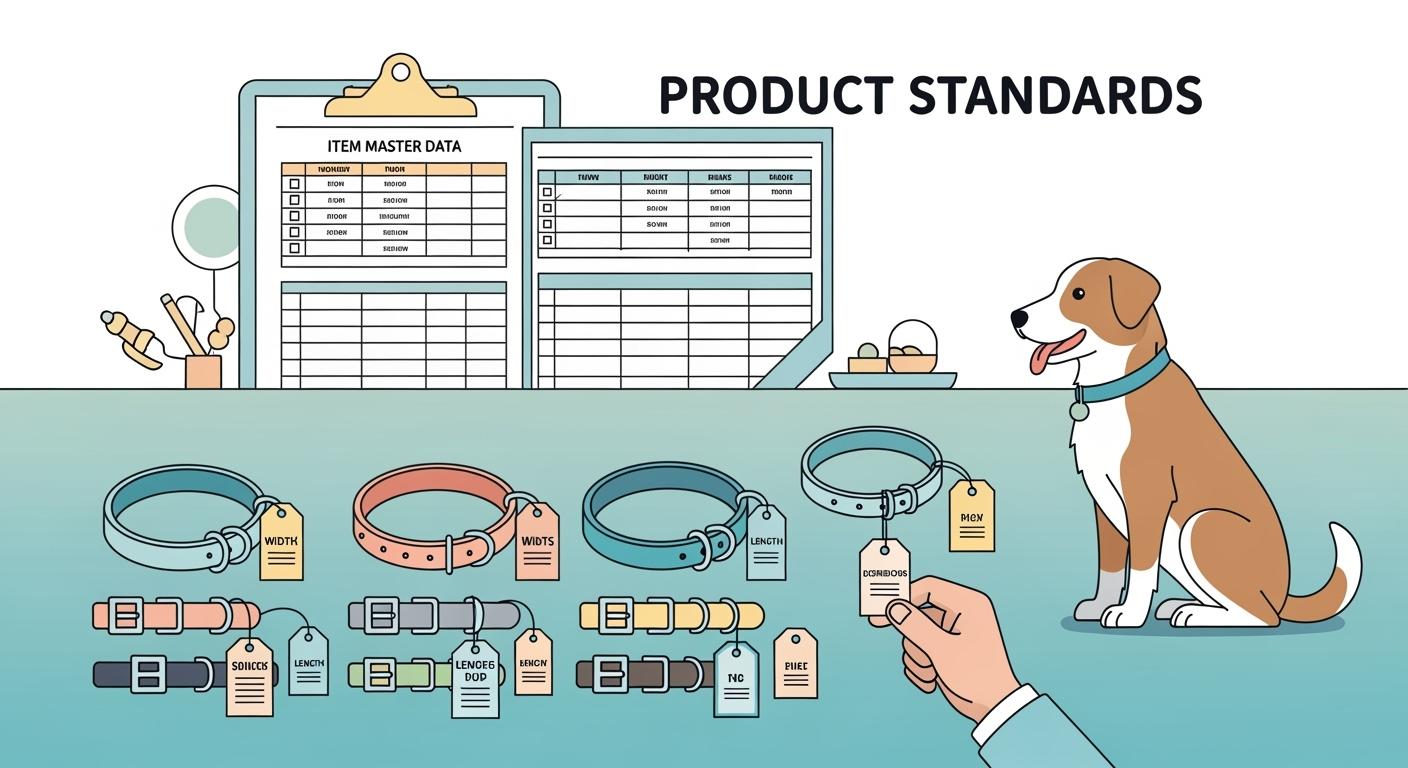
You need to use clear attribute standards when you add collars for dogs to your item master. Measure collar width at the narrowest strap section. Record the length range as the smallest and largest internal neck size the collar can fit. Choose the buckle type from a set list of options. These rules use only facts you can measure or see. This helps you compare every dog collar for dogs and avoid mistakes.
Key Takeaways
Measure collar width at the thinnest part of the strap. This helps you get the right size for each dog.
Write down the smallest and biggest neck size the collar fits. This stops mix-ups and makes sure the collar fits well.
Pick buckle types from the approved list. This keeps your catalog neat and easy to use.
Use inches and centimeters for every measurement. This helps everyone know the sizes better.
Look for duplicate SKUs by checking only measurable data. This stops mistakes and keeps your catalog easy to read.
Scope of Collars for Dogs Attribute Standards
You need clear standards when you add collars for dogs to your catalog. These standards help you keep your catalog organized and prevent mistakes. When you use the same rules for every collar, you can compare each dog collar easily. You also avoid duplicate SKUs, which means you do not have two records for the same collar. This makes your catalog simple to manage and helps you find the right collar for every dog.
OEM stands for Original Equipment Manufacturer. This means a company makes a product that others sell under their own name. ODM means Original Design Manufacturer. This company designs and makes a product, and others can sell it with their own brand. You may see both types when you add collars for dogs to your catalog.
Preventing Duplicate Collar SKUs
You can stop duplicate SKUs by using only measurable data for each collar. Record the width at the narrowest part of the strap. Write down the length range as the smallest and largest neck size the collar can fit. Choose the buckle type from a set list. Do not use words like small or big. Use numbers and approved terms. This way, you do not add the same collar twice by mistake.
Comparable Width and Length for Dogs
You need to measure width and length the same way for every collar. Measure the width where the strap sits on the dog’s neck. For the length range, measure the inside of the collar at the smallest and largest settings. This helps you compare collars for little dogs and large dogs. You can see which collar fits which dog. You can also check if the collar uses heavy-duty stitching, durable fabric, or long-lasting metal and plastic parts.
Consistent Buckle Type for Best Dog Collars
You must use a set list for buckle type. Pick from options like plastic side-release, metal roller, or quick-release buckles. Do not write your own words. This keeps your catalog clear. You can also note if the collar has safety features like reflective straps or breakaway buckles. Some collars follow rules like CPSIA or EN71-3. When you use these standards, you help people find the best collar for their dogs.
Core Collar Attribute Definitions
Collar Width for Dogs
You need to measure collar width the same way every time. Collar width means the distance across the strap where it sits on the dog’s neck. Do not include padding or decorations in this measurement. Always use the narrowest part of the strap that touches the dog. This helps you compare collars for dogs and makes sure you do not mix up sizes.
You should use both inches and centimeters for collar width. Write the number in each unit. For example, if the collar width is 1 inch, also write 2.5 centimeters. This helps everyone understand the size, no matter what unit they use.
You can see the recommended collar width for different dogs in the table below. This table helps you pick the right collar for little dogs and big dogs. It also shows the neck size range for each group.
Dog Size Category | Recommended Collar Widths | Neck Size Range |
|---|---|---|
MICRO & SMALL FRAMED DOGS | 1/2″, 5/8″, 3/4″ | 9″-12″ |
SMALLER & MEDIUM FRAMED DOGS | 3/4″, 1″ | 13″-15″ |
LARGER FRAMED DOGS | 1.25″, 1.5″ | 16″-19″ |
EXTRA LARGE FRAMED DOGS | 1.5″, 2″ | 70+ pounds |
You must always check that the collar width in your listing matches the real collar. If you use the wrong collar width, the collar may not fit the dog well. Always label the collar width clearly and do not mix inches and millimeters.
Collar Length Range
Collar length range means the smallest and largest neck size the collar can fit. You must measure the inside of the collar at the tightest and loosest settings. Do not use the outside length or the total strap length. Only use the part that touches the dog’s neck.
You should write the collar length range in both inches and centimeters. For example, a collar might fit necks from 10 inches to 15 inches, or 25 to 38 centimeters. This helps you compare collars for dogs and makes it easy for anyone to find the right size.
You can see how different collar types and sizes match neck size ranges in the table below. This table helps you see which collar fits which dog.
Collar Type | Size | Neck Size Range |
|---|---|---|
Martingale Collars | X-Small | 8-12″ |
Small | 11-15″ | |
Medium | 13-18″ | |
Large | 14-22″ | |
X-Large | 17-26″ | |
Pin/Cavesson Buckle Collars | Small | 10-14″ |
Medium | 12-16″ | |
Large | 15-19″ | |
X-Large | 17-22″ | |
Quick/Side Release Buckles | X-Small | 8-12″ |
Small | 10-15″ | |
Medium | 12-18″ | |
Large | 14-22″ | |
X-Large | 17-25″ |
You can also look at the chart below to see how neck size ranges compare for different collar types and sizes.
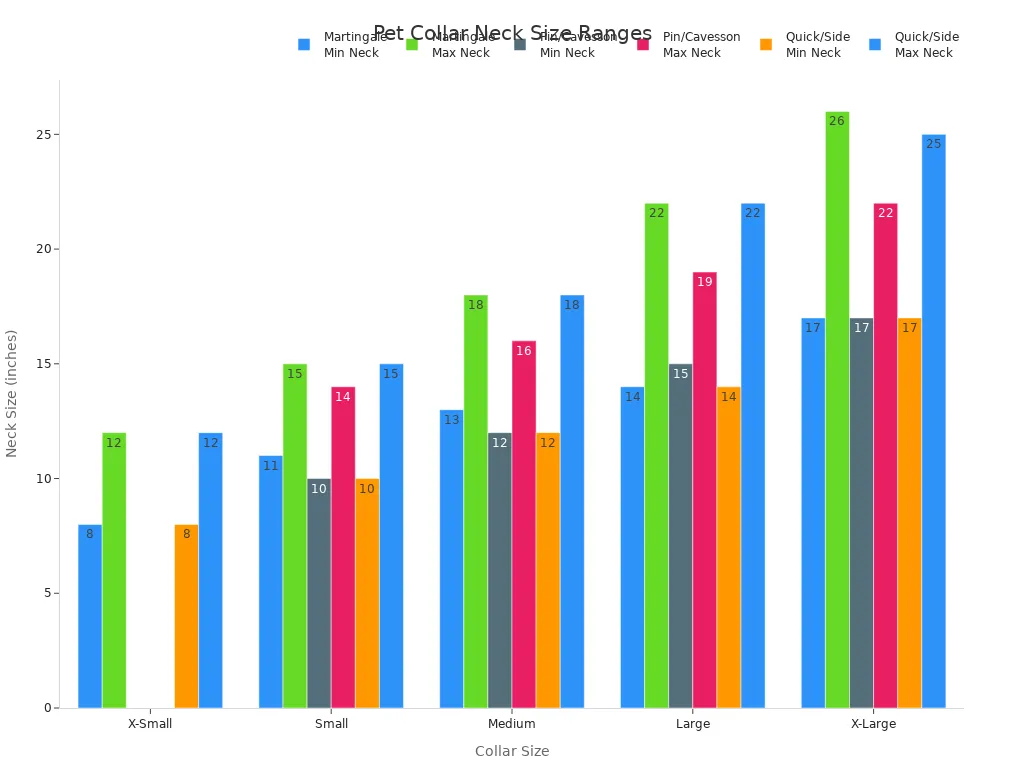
You must always include both collar width and neck range in your product name or subtitle. This helps people pick the right collar for their dogs.
Collar Buckle Type
Collar buckle type means the main way you fasten the collar around the dog’s neck. You must use a set list of buckle types. Do not write your own words. This keeps your catalog clear and easy to use.
Here are the main buckle types you can use for collars for dogs:
Plastic Side-Release Buckle: Opens and closes quickly with a click.
Metal Roller Buckle: Uses a metal bar that rolls as you fasten the collar.
Metal Pin Buckle: Looks like a belt buckle with a pin that fits into holes.
Quick-Release Buckle: Opens fast, not tied to a brand.
Limited-Slip Hardware: Used for collars that tighten a little when the dog pulls.
Martingale Hardware: Has two loops, often used for sighthound breeds.
You can see some examples below:
Martingale collars have two loops that tighten gently when the dog pulls.
Pin or cavesson buckle collars use a metal pin and come in different collar width sizes.
Quick or side release buckles open and close with a click.
You must always pick the buckle type from the approved list. This helps you avoid mistakes and keeps your catalog organized.
You can also use controlled vocabulary sources to keep your collar buckle types and other terms clear. Some good sources are:
Vocabulary Source | Description |
|---|---|
Library of Congress Name Authority File (LCNAF) | Includes names for titles, persons, groups, and geographic locations. |
Virtual International Authority File (VIAF) | Combines name authority files from national libraries and research institutions worldwide. |
Library of Congress Subject Headings (LCSH) | A comprehensive list of terms used to describe resources across various formats. |
Tip: Always check the physical collar to make sure the collar width, length range, and buckle type match your listing. This helps you avoid errors and keeps your catalog accurate.
Measurement and Unit Rules for Collars
Dual-Unit Policy (inches/cm)
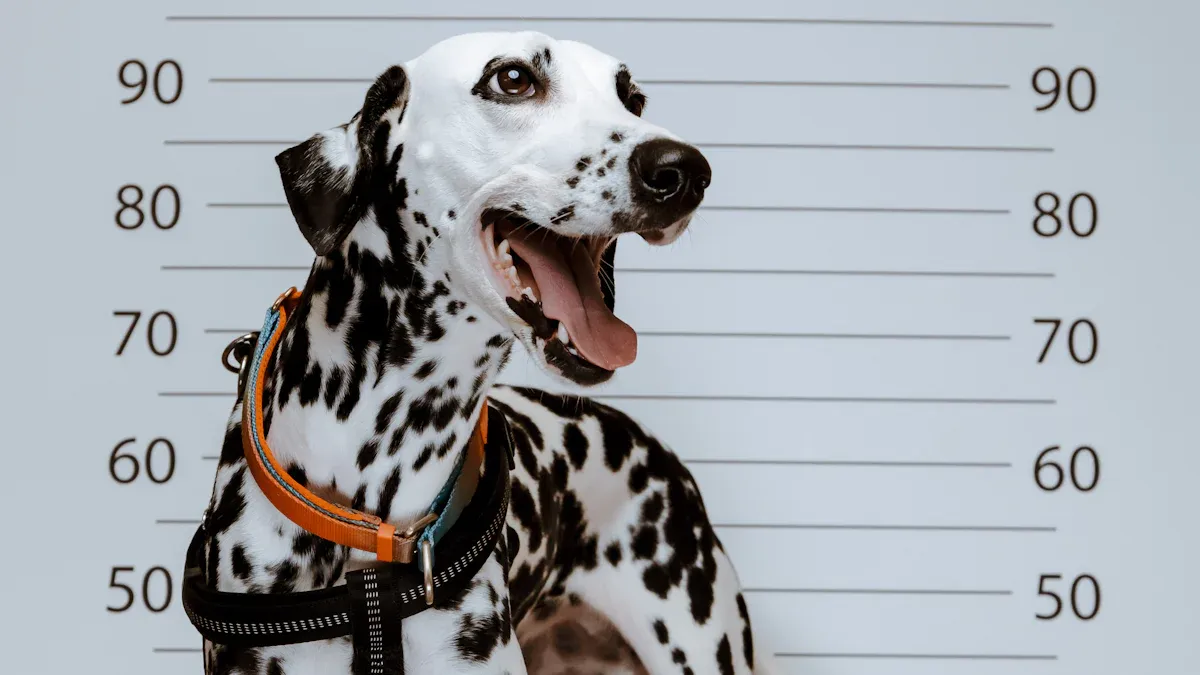
You must always record collar width and length range in both inches and centimeters. This rule helps you compare collars for dogs from different suppliers. Some people use inches, and others use centimeters. You make your catalog clear when you show both units. For example, if a collar width is 1 inch, you also write 2.5 centimeters. You should use this rule for every collar you add. This makes it easy for anyone to check sizing and pick the right collar for their dog.
Precision and Rounding for Dog Collar Sizes
You need to use clear rules for rounding collar measurements. Always round collar width and length to the nearest tenth of an inch or centimeter. If you measure a collar at 0.97 inches, round it to 1.0 inch. For open-end collars, round down to the nearest even size. For example, if a collar measures 19 inches, you list it as an 18 to 21 inch collar. This keeps your catalog simple and helps you avoid confusion. You must also add extra inches to the neck measurement for comfort. For most collars, add 2 inches to the dog’s neck size. For small dogs, add 1 inch. For extra-large dogs, add 3 inches. This rule helps you get the right fit for every dog.
Measurement Type | Rounding Policy | Example |
|---|---|---|
Collar width | Nearest tenth (in/cm) | 0.97 in → 1.0 in |
Length range | Nearest tenth (in/cm) | 14.23 in → 14.2 in |
Open-end collar | Round down to nearest even size | 19 in → 18-21 in collar |
Tolerance Fields for Collars
You must include tolerance fields for every collar. Tolerance means the small difference you allow in collar width or length when you measure. For example, you can set a tolerance of plus or minus 0.1 inch for collar width. This helps you check if the collar matches the catalog data. You should always measure where the collar sits on the dog’s neck. Use a flexible tape and keep it snug, not tight. Add extra inches for comfort. Always use the two-finger rule to check the fit. These steps help you keep your sizing data correct for all collars for dogs, including collars for little dogs. You make sure every collar fits the dog well and matches the catalog.
Controlled Vocabulary for Collar Attributes
You need to use controlled vocabulary when you add a collar to your catalog. This means you pick words from an approved list for each attribute. You do not make up your own terms. This helps you keep your catalog clear and easy to search. When you use the same words for every collar, you stop mistakes and make sure every dog gets the right fit.
Buckle Type Values for Collars
You must choose the buckle type from a set list. This keeps your catalog organized and helps you compare collars for dogs. Here are the approved buckle types you can use:
Plastic Side-Release Buckle
Metal Roller Buckle
Metal Pin Buckle
Quick-Release Buckle
Limited-Slip Hardware
Martingale Hardware
Double Bar Collar Buckle
Collar Buckle
You should always use these terms when you add a new collar. This makes it easy to find the right collar for every dog.
Hardware Material Options
You must also use approved terms for hardware material. Hardware means the metal or plastic parts on the collar, like the buckle or D-ring. The table below shows the main options you can use:
Hardware Material | Description |
|---|---|
Brass | Good for medium dogs, may bend with strong pull |
Stainless Steel | Strong and resists rust, best for large dogs |
Zinc Alloy | Best for small or gentle dogs |
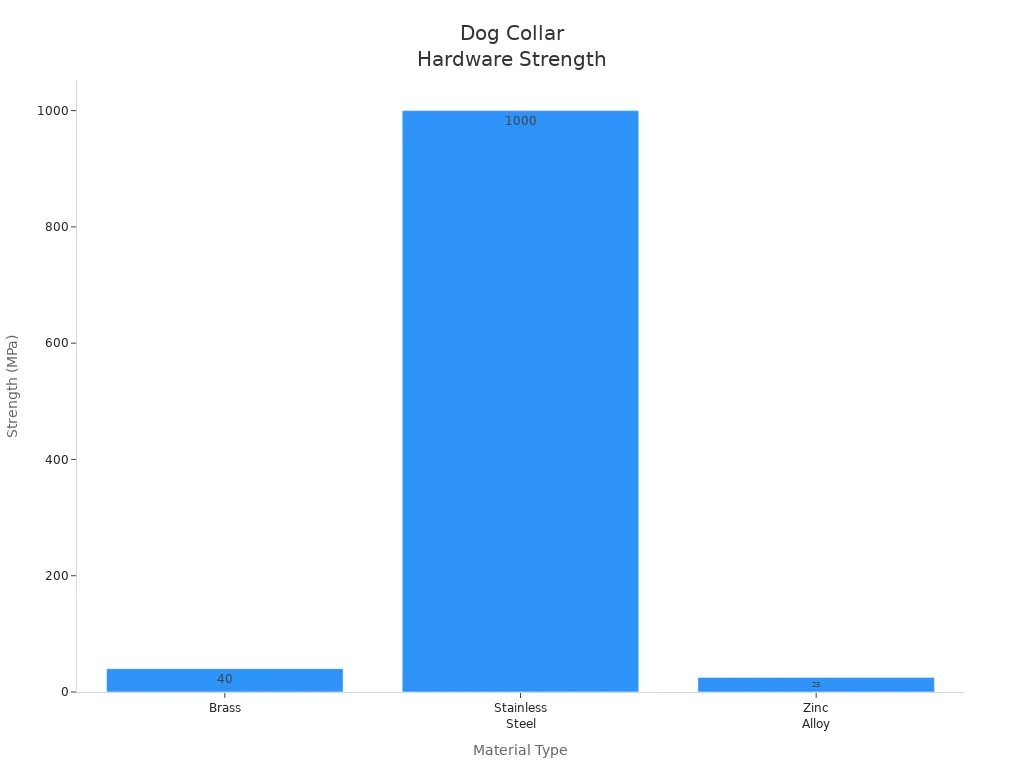
You should pick the hardware material that matches the size and strength of the dog. This helps you make sure the collar works well for collars for little dogs and big dogs.
Strap Material Options
Strap material means the main part of the collar that goes around the dog’s neck. You must use approved terms for this too. Here are the main options:
Nylon Webbing
Polyester Webbing
Leather
Coated Webbing
You should always use these words in your catalog. This helps you compare collars and check sizing for every dog.
Note: Controlled vocabulary helps you keep your catalog free from errors. When you use the same words for each collar, you make it easy for people to search and find the right collar for their dogs. You also help your team avoid mistakes when adding new collars for dogs.
The table below shows how controlled vocabulary helps your catalog:
Concept | Explanation |
|---|---|
Controlled Vocabulary | Uses the same words for each collar attribute. |
Catalog Errors Reduction | Stops confusion and mistakes in collar listings. |
Consistency Improvement | Makes it easy to search and compare collars for every dog. |
You use the same term for the same thing.
You help people search for the right collar.
You group similar collars together, even if people use different words.
This system keeps your catalog clear and helps every dog get the right collar.
Parent-Child Variant Logic for Dogs Collars
When you set up your item master for collars, you need a clear system for parent and child variants. This helps you keep your catalog for dogs organized and easy to search. You can use a parent style to group all collars that share the same main features. Each child variant shows a change in size or color. This structure lets you manage many collars for dogs without confusion.
Parent Style vs Size and Color Variants
You use the parent style to hold all the shared details for a collar. This includes the main strap material, buckle type, and hardware. Each child variant changes only one thing, like the length range or the color. For example, you might have a parent collar for dogs with a nylon strap and a plastic side-release buckle. The child variants show the different sizes and colors for that collar. This makes it easy to find the right collar for every dog.
Here is a table that shows how you can set up your SKUs:
SKU Type | Description |
|---|---|
Master Product | Template for all collars with shared features. |
Variant Product | One collar with a unique size or color. |
Multi-Level Hierarchy | Parent collar with many size and color options. |
Inheritance System | Changes to the parent collar update all child variants. |
You can also use display types to group collars for dogs. Some common displays include assorted pet collars, cushion collars, and rainbow dog collar displays.
New Product vs Variant Rules
You need to know when a change means a new product or just a new variant. If you change the strap material, buckle type, or hardware material, you create a new parent collar. If you only change the length range or color, you add a new child variant. This rule keeps your catalog for dogs clear and stops you from making duplicate records. Always check the main features before you add a new collar.
Overlap in Collar Length Ranges
You must watch for overlap in collar length ranges. If two collars for dogs have the same length range and features, you may have a duplicate. Use clear rules for the minimum and maximum neck size for each collar. Do not leave gaps or overlaps between sizes. This helps you make sure every dog can find a collar that fits well.
Tip: Always use measurable data for each collar. This keeps your catalog for dogs accurate and easy to use.
Item Master Field List for Collars
You need a simple list of fields when you add a collar for dogs to your item master. These fields help you keep your catalog neat and stop mistakes. You can use tables and lists to see what you need for each collar. This makes it easy to compare collars for dogs and stops you from adding the same collar twice.
Identification Fields (SKU, GTIN)
You must use special codes to tell each collar apart. The SKU connects each collar to its parent style. The GTIN helps you track the collar in different systems. Here is a table with the main identification fields:
Field | Purpose | Status |
|---|---|---|
Parent SKU | Links variants to their parent product | Required |
SKU | Unique code for each collar variant | Required |
GTIN | Global code for tracking the collar | Optional |
These fields help you find each collar for dogs fast. You can also use them to group collars by style or size.
Sizing Fields for Collars
You must write down the sizing fields for every collar. These fields show the width and length range. You need both inches and centimeters. This helps you compare collars for all dogs. Here are the main sizing fields:
Width (inches and centimeters)
Length range (minimum and maximum, in inches and centimeters)
You should always measure the collar where it sits on the dog’s neck. This keeps your sizing data right for every collar.
Closure and Adjustment Fields
You need to show how the collar closes and adjusts. These fields help you tell collars apart. You must use approved words for buckle type and adjustment method. List the number of adjustment points if needed. This helps you manage collars for dogs with different neck sizes.
Buckle type (from approved list)
Adjustment method (holes, slide adjuster, limited slip)
Adjustment points count
Supporting Fields for Best Dog Collars
You should add extra fields to stop duplicate collars and help manage your catalog. These fields include material, color, hardware type, and finish. You must keep these fields neat. This makes it easy to filter and search for collars for dogs.
Attribute | Importance |
|---|---|
Length | Main variant, stops duplicates |
Hardware type | Key for telling collars apart |
Width | Helps manage catalog |
Material | Use neat fields for easy filtering |
Color | Secondary attribute |
Finish | List separately to stop confusion |
Tip: Always check that your packaging labels match your catalog names. This helps you avoid mistakes when you get new collars for dogs.
Templates for Collars for Dogs Data
Attribute Dictionary Table
You need a simple table for every collar field. This table helps you keep your catalog neat. You can use this template for your item master. Each field has a short note so you know what to write.
Field Name | Description | Example |
|---|---|---|
Collar Width | Strap width in mm and in | 25 mm / 1 in |
Neck Range | Adjustable neck size in mm and in | 250-380 mm / 10-15 in |
Buckle Type | Main closure type from approved list | Plastic Side-Release |
Strap Material | Main strap material | Nylon Webbing |
Hardware Material | Metal or plastic used for D-ring or buckle | Stainless Steel |
Hardware Finish | Surface look of metal parts | Matte |
D-Ring Position | Where the D-ring sits on the collar | Center |
Color | Main color of the collar | Red |
Pattern | Printed or woven pattern | Stripes |
Adjustment Method | How you change the collar size | Slide Adjuster |
Custom Logo | Type of logo or badge | Embroidered |
Personalization | Method for adding names or info | Engraved Nameplate |
Packaging | Type of packaging | Polybag |
Tip: Always use the same words for each field. This makes your collar data easy to read and compare.
Variant Naming Template
You can use a simple naming template for each collar. This helps you tell collars apart and stops mix-ups. Fill in each part with the right details.
Dog Collar, [Strap Material], [Collar Width] in, [Neck Range] in, [Buckle Type], [Color], [Pattern]
Example:
Dog Collar, Nylon Webbing, 1 in, 10-15 in, Plastic Side-Release, Red, Stripes
This template works for all collars for dogs. You can add or remove fields if you need to.
Supplier Data Submission Checklist
You need a checklist for suppliers who send you collar data. This list helps you get all the facts for each collar. You can use this checklist with your team.
Collar width in mm and in
Neck range in mm and in
Buckle type from approved list
Strap material and hardware material
Hardware finish and D-ring position
Color and pattern options
Adjustment method and points
Custom logo and personalization method
Packaging type
Minimum order quantity
Note: Ask suppliers to use only approved words for each field. This keeps your collar catalog clear and free from mistakes.
Mandatory Tables for Dogs Collar Standards
Attribute Dictionary Table
You need a simple attribute dictionary table when you add a collar for dogs to your catalog. This table helps you use the same words and numbers for every collar. It shows what each field means and what kind of data you need. You can also see how to check your work. The table keeps your catalog neat and easy to use.
Field Name | Definition | Data Type | Units | Allowed Values | Example | Source of Truth | Required/Optional | QA Rule |
|---|---|---|---|---|---|---|---|---|
Collar Width | Strap width at neck | Numeric | in, cm | 0.5-2 in, 13-50 mm | 1 in | Physical sample | Required | Measure at narrowest point |
Neck Range | Internal neck fit range | Numeric | in, cm | 8-26 in, 200-660 mm | 10-15 in | Physical sample | Required | Measure inside collar |
Buckle Type | Main closure type | Enum | N/A | See approved list | Plastic Side-Release | Physical sample | Required | Use controlled vocabulary |
Strap Material | Main strap material | Enum | N/A | Nylon, Leather, Polyester | Nylon Webbing | Supplier spec | Required | Use approved list |
Hardware Material | Metal or plastic hardware | Enum | N/A | Stainless Steel, Brass, Zinc | Stainless Steel | Supplier spec | Required | Use approved list |
Adjustment Method | How collar size changes | Enum | N/A | Holes, Slide Adjuster | Slide Adjuster | Physical sample | Required | Use approved list |
Color | Main color | String | N/A | Any standard color | Red | Supplier spec | Required | Match physical sample |
Pattern | Printed or woven pattern | String | N/A | Stripes, Solid, Dots | Stripes | Supplier spec | Optional | Match physical sample |
Adjustment Points | Number of size changes possible | Numeric | N/A | 1-10 | 5 | Physical sample | Optional | Count points |
Product Weight | Weight of collar | Numeric | g, oz | 10-200 g | 50 g | Physical sample | Optional | Weigh collar |
You can also add fields like size label, fit chest girth range, fit weight range, leash points, product dimensions, packaged dimensions, materials primary, care instructions, and safety notes. These fields help you compare collars for dogs and avoid mistakes.
Parent-Child Mapping Table
You need a parent-child mapping table to show how each collar for dogs connects to its variants. This table helps you group collars by style, size, and color. You can see which collars share the same main features. This stops you from adding the same collar for dogs twice.
Parent SKU | Child SKU | Collar Width | Neck Range | Buckle Type | Strap Material | Color | Variant Attribute Changed |
|---|---|---|---|---|---|---|---|
10001 | 10001-RED | 1 in | 10-15 in | Plastic Side-Release | Nylon Webbing | Red | Color |
10001 | 10001-BLU | 1 in | 10-15 in | Plastic Side-Release | Nylon Webbing | Blue | Color |
10001 | 10001-GRN | 1 in | 10-15 in | Plastic Side-Release | Nylon Webbing | Green | Color |
10002 | 10002-12 | 0.75 in | 8-12 in | Metal Pin Buckle | Leather | Brown | Neck Range |
10002 | 10002-16 | 0.75 in | 12-16 in | Metal Pin Buckle | Leather | Brown | Neck Range |
You can use this table to check for errors. If two child SKUs have the same collar width, neck range, and buckle type, you might have a duplicate. Always check your parent-child mapping table before you add a new collar for dogs.
Tip: Use these tables every time you add a new collar for dogs. You will keep your catalog clear and help every dog get the right fit.
QA Checklist for Best Dog Collars
You need a strong QA checklist to keep your catalog for best dog collars accurate. This helps you prevent errors and keep data consistent. You can use this checklist every time you add or review a collar for dogs.
Collar Width Checks
You must measure collar width at the narrowest part of the strap. Write the number in both inches and centimeters. Check that the width matches the listing for each best dog collars entry. Use a flexible tape to measure where the collar sits on the dog. Do not include padding or decorations. If you see a difference, update the catalog. This step helps you compare collars for dogs and keeps your sizing data right.
Collar Length Range Checks
You need to measure the collar length range as the smallest and largest neck size the collar can fit. Use only the inside of the collar for this. Record the numbers in both inches and centimeters. Check that the length range matches the best dog collars listing. Make sure the adjustability works for all dogs in the range. If you find a mistake, fix it before you add the collar to your catalog.
Buckle Type Validation
You must pick the buckle type from the approved list. Do not use free text or new words. Check the physical collar to see the main closure. Match it to the controlled vocabulary for best dog collars. This step helps you keep your catalog clear and easy to search. You can also check the durability of the buckle by looking at how it holds up in daily use. For a reflective dog collar, make sure the buckle type is correct and matches the listing.
Duplicate Detection for Collars
You need to check for duplicate collars for dogs. Look for collars with the same width, length range, buckle type, strap material, and color. Use your parent-child mapping table to spot duplicates. If you find two best dog collars with the same data, keep only one. This step helps you avoid confusion and keeps your catalog neat.
Tip: You can use regular review cycles and automated alerts to catch errors early. Assign a team member to check data quality for best dog collars. Track how fast you fix mistakes and how often they happen.
Testing Methodology | Purpose |
|---|---|
Tensile Strength Testing | Checks how much force a collar can take before it breaks. |
Abrasion Resistance Testing | Looks at how well the collar stands up to daily wear. |
Hardware Component Testing | Tests the durability of buckles and D-rings. |
Environmental Exposure Testing | Sees how the collar does in different conditions. |
You should always check adjustability, durability, and fit for every best dog collars entry. For a reflective dog collar, check that the reflective parts are present and match the catalog. This process helps you give every dog the right collar and keeps your catalog for dogs free from errors.
You can follow a clear standard for collars for dogs in your item master. Use a standard for collar width, length range, and buckle type. Measure each collar with the same standard. Record every detail using the standard. Check your catalog with the standard to find errors. Use the standard for every dog and every collar. The standard helps you keep fewer mistakes. The standard makes catalog work simple. The standard lets you work with suppliers easily. The standard grows with your dogs and your collar product line.
Use the templates and checklists to keep your standard strong as you add new collars for dogs.
FAQ
What is the correct way to measure collar width?
You measure collar width at the narrowest part of the strap that sits on the dog’s neck. Do not include padding or decorations. Always use a ruler or tape measure for accuracy.
How do you record the collar length range?
You measure the inside of the collar at the smallest and largest settings. Write both numbers in inches and centimeters. Only use the part that touches the dog’s neck.
Why do you use controlled vocabulary for buckle type?
Controlled vocabulary helps you use the same words for every collar. This makes your catalog easy to search and compare. You avoid mistakes and keep your data clear.
Can you use dog weight to choose collar size?
You should not use dog weight as the main way to pick collar size. Always use neck measurements. Weight can help as a guide, but neck size gives the best fit.
What should you check to prevent duplicate collar SKUs?
Check the collar width, length range, buckle type, strap material, and color. If these match another collar, you may have a duplicate. Use your parent-child mapping table to help.